Introducing Process Alert, alarm notification embedded in AVEVA Application Server
Most alarm notification packages are external agents polling Application Server. Process Alert is internal to the application, so it pushes notifications, and every one of them carries the context the Galaxy already holds.
Process Alert can be used with any SCADA, HMI or MES Application Server based system to send intelligent alarm or event notifications. Rich notifications, generated from unified namespace context.
Alarm notification is an important part of any SCADA system, especially if on-call response operators are involved.
Typically, alarm notification software packages on the market are external agents polling Application Server's alarm status. Process Alert is internal to the application, so it pushes alarm notifications.
Why does it matter?
Consider a high pressure alarm associated with a 4-20 mA analog pressure input PIT-100.
An external agent had to have that alarm manually configured to begin with. Then it can monitor Application Server alarms, detect "PIT-100 High Pressure Alarm" and send a notification. Good.
Here is how Process Alert would handle the same alarm.
First, once Process Alert has been integrated into the Galaxy, no per-tag configuration is required. Any alarm will be automatically monitored.
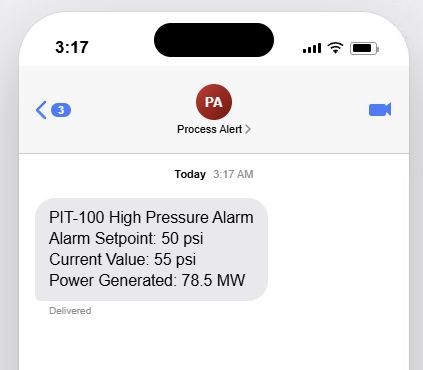
Then, Process Alert can send this alarm notification:
PIT-100 High Pressure Alarm Alarm Setpoint: 50 psi Current Value: 55 psi
Remote on-call operators need this extra context to assess the gravity of the situation.
Because Process Alert lives inside the Galaxy, it sees alarm context the external pollers cannot. For instance, in the power generation industry, power being generated is important context to any alarm. The response might be different if the plant is generating 5 MW rather than 80 MW.
Process Alert is routinely integrated with our own implementations of AVEVA System Platform. But it can also be integrated with any pre-existing Application Server deployment.
Many more features on top of that
- Process Alert supports multiple notification queues and escalation paths, so alarms from different parts of the system can go to different response teams. Notification targets can be email, text message or voice call.
- The right schedule is automatically applied when holidays fall on weekdays.
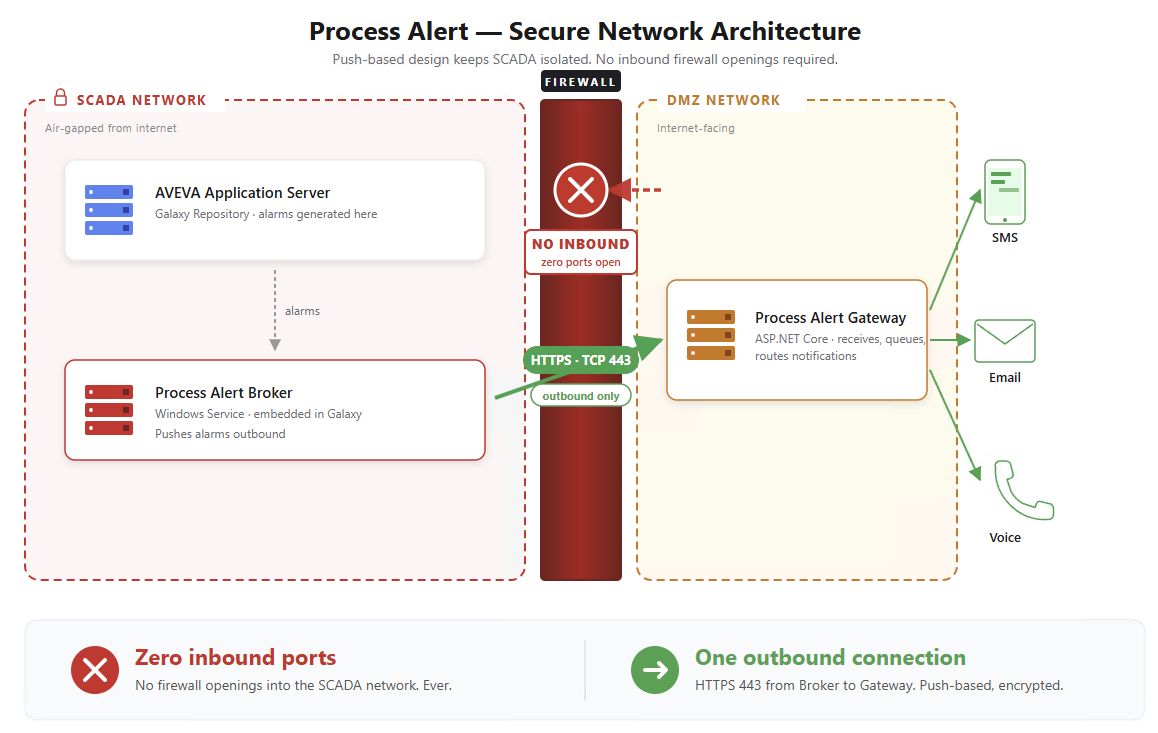
- One way communication from SCADA to DMZ using a configurable outbound-only port, Tiered Historian style.
If you would like to know more, or try Process Alert with your own application, get in touch.