Process Alert
Industrial alarm notification that ensures your team responds, day or night.
An alarm nobody sees is not an alarm. Control networks are deliberately cut off from the internet, which is the right call for security and no help at two in the morning when the on-call operator is at home and a lift station is filling. Process Alert carries alarms out of an air-gapped AVEVA System Platform control network, puts them in front of the person whose turn it is, and records whether anyone answered.
What it does
- Alarms arrive with their context. Notifications are generated by the Application Server objects themselves, so an alert carries the equipment it came from and the area it belongs to, not a bare tagname and a number.
- Email, text message and voice call. Text messages reach a phone with no data coverage. Voice calls read the alarm out loud, which is what you want when the person on call is driving.
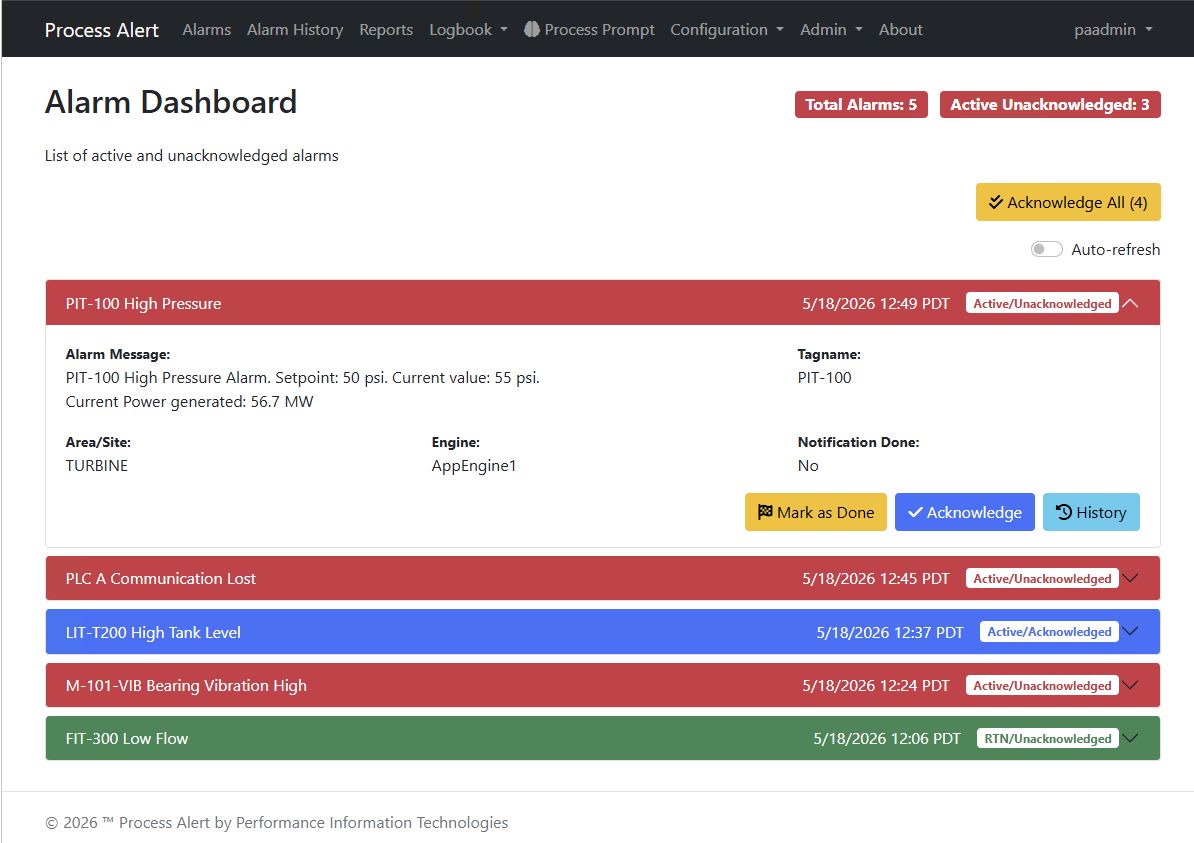
- Acknowledge by email reply or from the dashboard. Personal acknowledgment codes ensure accountability. Replies are checked against the sending address, and the integrity of every acknowledgment is verified.
- Escalation that stops once the acknowledgment is confirmed. Notification queues run ordered steps with delays and repeats, aimed at specific SCADA areas and engines, so the chlorine room does not page whoever is covering the pump station.
- Schedules. Queues activate by day and time range, with priority schedules for holidays and temporary cover.
- Event notifications. Not everything needs answering. A batch start, a filter backwash finishing, a stage transition: send it, log it, no acknowledgment and no escalation.
- Reports you can read from outside the plant. Build tabular reports from equipment attributes, historized or live, picking tags straight off the equipment hierarchy. They are built in the Gateway's web interface, so nobody needs a seat in the control system to create one.
- The record of what happened. Every alarm moves through active, acknowledged and returned to normal, each transition timestamped, alongside who was notified and how.
How it works
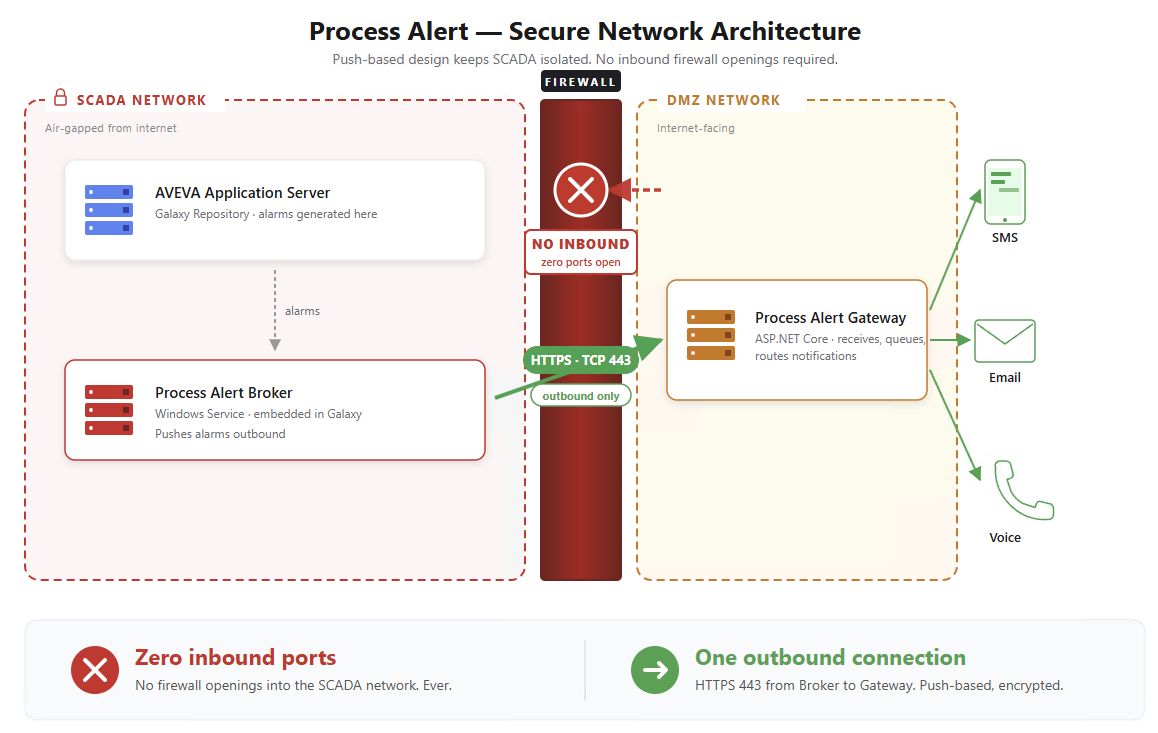
Two services. A Broker inside the SCADA zone watches the application for alarms. A Gateway on the internet-connected side sends the notifications and takes the acknowledgments.
The part a security review asks about is the direction of travel. The Broker has no listener. It opens every connection itself, outbound, and acknowledgments come back down those same connections. There is no inbound firewall rule to write, and Process Alert opens no path from the DMZ into the plant.
Use cases
Two in the morning at a lift station. A wet well starts filling faster than the pumps can clear it. The alarm reaches the operator on call as a text message, naming the station and the pump. No reply after ten minutes, so the queue calls their phone and reads it out. Still nothing, so it moves to the supervisor. The moment somebody acknowledges, the rest of the queue stands down.
Proving what happened. A regulator asks about an overflow six weeks ago. The alarm record shows when the condition started, who was notified, on which channel, when each person was reached, who acknowledged it and when the condition returned to normal. That takes a few minutes, not a morning spent reconstructing a timeline from memory.
Questions
Do we have to open a port into the control network? No. The Broker sits inside the control network and makes only outbound connections. Nothing from the DMZ initiates a connection inward.
What happens if nobody answers? That is what notification queues are for. A queue runs ordered steps with delays, repeats and its own escalation path, so an unanswered alarm keeps climbing until somebody confirms it rather than sitting unread in one person's inbox.
Can we see who was told, and when? Yes. The Gateway keeps the delivery and escalation history per alarm, so you can see every attempt on every channel and how each one turned out.